| JN "Essential Documents in American History" and SU "women" (These are only a few of the documents found under this heading.) |
 |
Essential Documents In American History; Political Transcripts and Congressional Testimony
via MAS Ultra
WIU has recently acquired a number of databases, one of which, the awkwardly named MAS Ultra, will be of particular interest to faculty teaching American History, American Politics, or American Literature.
MAS Ultra contains the complete contents of Essential Documents in American History, meaning the database contains the Declaration of Independence, Franklin's Day of Infamy Speech, Lincoln's Second Inaugural, as well as the complete Federalist Papers and hundreds of other documents important to American history and culture.
MAS Ultra also contains FDCH's Political Transcripts (transcripts of speeches, remarks, press conferences etc. made by the president and congressional leaders) and FDCH's Congressional Testimony. The congressional testimony and political transcripts are also available via Academic Universe. What makes MAS Ultra useful to faculty is the ability to link directly to these documents from an online syllabus or bibliography, an option not provided by Academic Universe.
To search MAS Ultra follow the steps below:
If you are accessing this page on campus simply click here to get to MAS Ultra.
If you are accessing this page off campus:
Go to WIU Libraries' Home Page
Click on Online Databases
Click on Alphabetical List
Go to MAS Ultra
Click on MAS Ultra. Follow directions for off-campus access.
1) Once the Basic Search interface opens, copy and paste one of the following into the search area:
For essential documents: JN "Essential Documents in American History"
For political transcripts: SO "FDCH Political Transcripts"
For congressional testimony: SO "FDCH Congressional Testimony"
"JN" tells the database you want to restrict a search to a particular journal or publication. Likewise, "SO" tells the database to restrict a search to particular information source. The name of the publication or information source goes within quotation marks.
2) Next, use the subject (SU) or author (AU) or title (TI) qualifier to complete the search statement.
Below in red are a number of examples using Essential Documents in American History.
| JN "Essential Documents in American History" and SU "women" (These are only a few of the documents found under this heading.) |
|
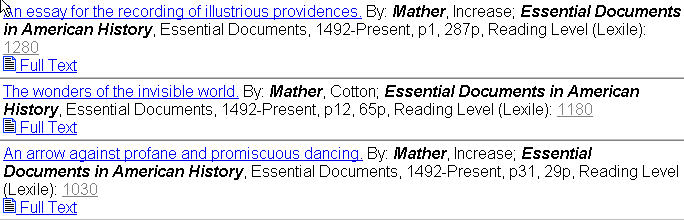
| JN "Essential Documents in American History" and AU "mather" |
 |
| JN "Essential Documents in American History" and TI "second inaugural address" and AU "cleveland" |
 |
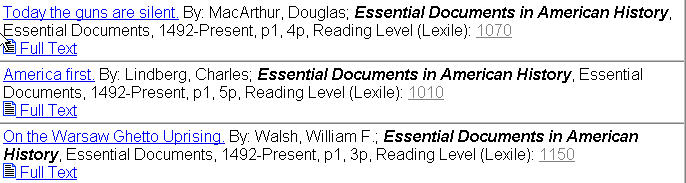
| JN "Essential Documents in American History" and SU "World War 1939-1945" (these are only a few of the documents found under this heading) |
 |
It is also possible to link directly to documents to create online bibliographies for your students. For instance the following link should take you to Increase Mather's diatribe, An arrow against profane and promiscuous dancing.
If you are going to make a linked bibliography, you will need a stable URL. It's easy to get the stable URL from MAS Ultra once you know where to get it. For reasons of its own, MAS Ultra obscures this process a little by providing stable URLs for its documents via either the save-document or e-mail-document functions. In other words, to acquire a stable URL you have to initiate the save or e-mail document process.
Take the example below using the Save route. (The e-mail route works the same way)

Clicking on the SAVE button will take you to:
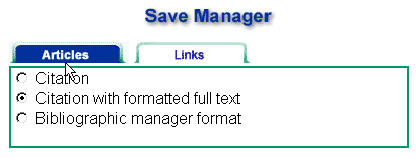
Next: clicking on the Links tab brings up:
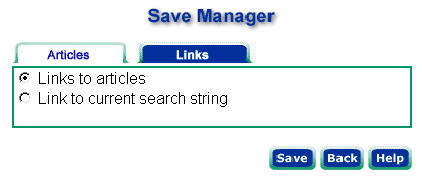
Click on the Save button to get the URL.
