Using Communication Abstracts
Communication Abstracts is the best guide to the journal literature in the communication field. We subscribe to the paper version. It's located in the index shelves, right behind the reference desk. Communication Abstracts is bound by year. The most recent issues are unbound.
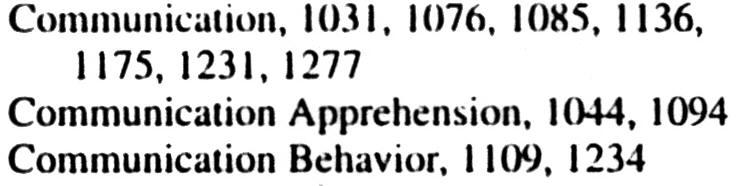
The easiest way to use Communication Abstracts is to use the subject index, which is located in the back of each individual volume or in the back of the bound volumes. Subjects are arranged alphabetically. The numbers that come after the subject heading refer to the abstracted articles. The abstracts are numbered from the beginning of the volume. They start at 0001 in February and continue in numeric order through each succeeding volume (Communication Abstracts comes out 4 times a year) to the last volume. To find an article, simply flip back through Communication Abstracts till you come across the number that you want. For example, the subject heading, Communication Behavior, has two abstracts. Let's imagine we want to look at 1109
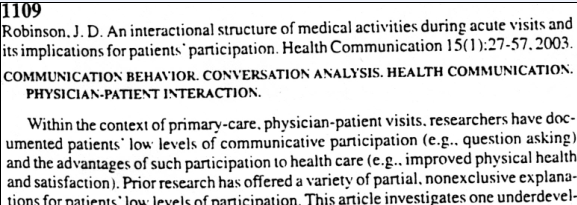
We page back to 1109, where we find the following citation and abstract. The citation tells us the article's title and its location, e.g. who wrote it, which journal published it , when, and on what page. The abstract summarizes the article. In this case the article was published in the journal, Health Communications, volume 15, issue 1, on pages 27 to 57.
If, after reading the abstract, we decide we want to read the article, we then need to see if WIU subscribes to that journal. To do this we need to consult the list of journals WIU subscribes to. You can access this list from the Library's web page, by selecting QUICK LINKS, then choosing PHL Full Text or by clicking here.
Using the citation, we get the name of the journal.

Once at the list, we enter the name of the publication
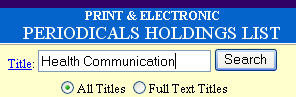
If you get a result, click on the appropriate one.
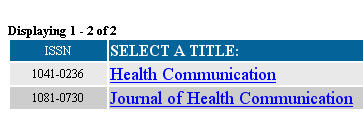
Looking at the information below, the database is telling you that your article can be found in the two linked databases. Articles are often found in more than one database. Simply click on one of the databases and do a title search to locate the full text of the article. If this does not work, you might want to consult a librarian. Sometimes retrieving an article can be trickier than it ought to be.

But what if the journal is not found in the database? No problem. You can use interlibrary loan. We will get the article for you from a library that has it. To initiate an inter library loan request go to the Online Services link on our web page or click here. Fill out the form. You need to allow 10 business days for the article to come to you--though it's usually faster than that. You will be notified by e-mail when the article arrives. You may access it digitally (if that's how it's sent to the library) or you may have to come to the library and pick up a photocopy.