Locating New York Times or Washington Post articles via Academic Universe
by William Thompson
The New York Times and the Washington Post are two of the nation's leading newspapers. Members of Congress, high ranking government administrators, leading businessmen, artists, and intellectuals, read these papers every day. The Times and the Post, along with a few other papers, like the Wall Street Journal, Los Angeles Times, and International Herald Tribune (owned by the New York Times, set the tone and the agenda of the conversation carried on among the nation's social and economic elites. And since many of the New York Times' and Washington Post's stories are republished in smaller papers around the nation, their influence stretches far beyond the East Coast. They have an exceptional staff. Both papers routinely win Pulitzer prizes and often multiple Pulitzers. Both the Times and the Post have the resources to fund in depth, long term reports on any topic that interests them. The New York Times has spent hundreds of thousands of dollars, for example, funding its own recount of the Florida presidential election results. It is for these reasons you are asked to learn to locate articles taken from these two papers. However, you can use the search techniques shown in this tutorial to search any newspaper in Academic Universe
Accessing Academic Universe on campus.
- Go to the WIU Libraries home page, http://www.wiu.edu/library/index.php
- Click on the Online Databases link.
- Click on Alphabetical Listing link (highlighted in blue on the
image below), not the drop box.
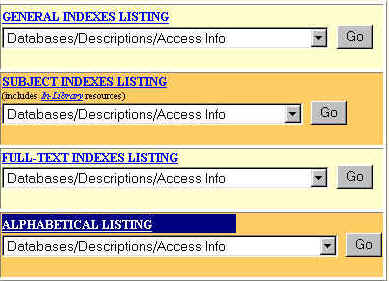
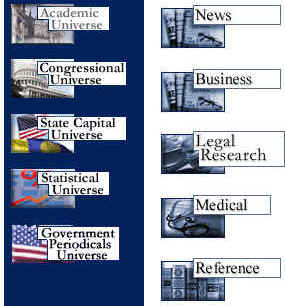
- Select Academic Universe. You will see a list
of databases that look as below:
Copyright ©
1995, 1996, 1997, 1998, 1999, 2000, 2001 Lexis-Nexis, a division of Reed
Elsevier Inc. All rights reserved. Reprinted with the permission of
Lexis-Nexis.
- Select the News database
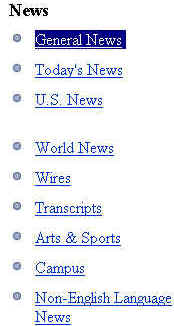
- Once you are in the News database you will see a sub-database named
Genral News--highlighted
in blue below.
Copyright ©
1995, 1996, 1997, 1998, 1999, 2000, 2001 Lexis-Nexis, a division of Reed
Elsevier Inc. All rights reserved. Reprinted with the permission of
Lexis-Nexis.
- Select it.
- You will be taken to the General News Basic
Search
menu. Actually, the menu available under the More Options tab is easier to
use. So click on the More Options tab.

Copyright ©
1995, 1996, 1997, 1998, 1999, 2000, 2001 Lexis-Nexis, a division of Reed
Elsevier Inc. All rights reserved. Reprinted with the permission of
Lexis-Nexis.
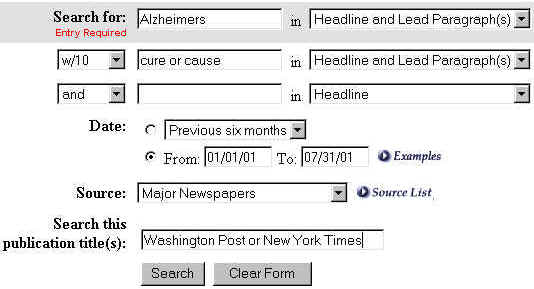
- The More Options menu will open. Now, assume that we are looking for
recent articles on the cause
or cure of Alzheimers. We want the articles to come from the Washington
Post or the New York Times. I only want articles published since January
1st, 2001. To do this fill in the search menu as I did in the image below.
I will explain the search structure beneath the image.
Copyright ©
1995, 1996, 1997, 1998, 1999, 2000, 2001 Lexis-Nexis, a division of Reed
Elsevier Inc. All rights reserved. Reprinted with the permission of
Lexis-Nexis.
Search Structure
- The Search For area is the only part of the
menu that must be filled out. I placed our primary search term here.
- Next I changed the search parameter from Headline
to Headline and Lead Paragraphs. I also did this for the secondary
search terms, "cure or cause." Here's why: Headline, the default
setting, directs the search engine only to search the headlines of
articles for our search terms. That's an excellent way to limit or
"focus" a search--since the odds of any word appearing in a
headline are much lower than they are for those appearing in the lead
paragraphs. However, we have already focused the search by limiting the
date only to articles published this year. To compensate for this,
we expand the search's focus within the text to the headlines and lead
paragraphs. It is often a good idea to balance a search, limiting one
focus of the search and expanding another. How to do this is
something you will get a better feel for as you do research.
 The w/10
tells the search engine that I want to find Alzheimers within 10 words of
either "cure" or "cause." This is called
"proximity searching" and it is very good way to narrow your
search. The idea is that if two words are 10 words apart they are probably
in the same sentence or same paragraph. And if, furthermore, those words
appear in sentence or paragraph that is either a headline or a lead
paragraph (the location for the "who," "what,"
"when," "where," "why," and "how"
information in a news story), the odds are pretty good that you will find
articles more about your topic than less.
The w/10
tells the search engine that I want to find Alzheimers within 10 words of
either "cure" or "cause." This is called
"proximity searching" and it is very good way to narrow your
search. The idea is that if two words are 10 words apart they are probably
in the same sentence or same paragraph. And if, furthermore, those words
appear in sentence or paragraph that is either a headline or a lead
paragraph (the location for the "who," "what,"
"when," "where," "why," and "how"
information in a news story), the odds are pretty good that you will find
articles more about your topic than less.
- It is easy to limit the extent of time you
want searched. Academic Universe accepts a number of different date
formats. If you click on the "Examples" link below. You can see
the different formats. Generally speaking, the greater the extent of time
you search, the more precise you want your search terms to be.

Copyright ©
1995, 1996, 1997, 1998, 1999, 2000, 2001 Lexis-Nexis, a division of Reed
Elsevier Inc. All rights reserved. Reprinted with the permission of
Lexis-Nexis.
Copyright ©
1995, 1996, 1997, 1998, 1999, 2000, 2001 Lexis-Nexis, a division of Reed
Elsevier Inc. All rights reserved. Reprinted with the permission of
Lexis-Nexis.
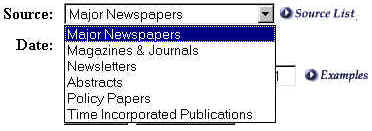
- The Source area
(see image above) controls
what part of the General News database you are searching. Major Newspapers
is the default. I imaged the "drop box" to give you the range of
formats/publications. There is a wide range of information available in the
other databases, but the Newspaper Database is by far the
largest in number of publications and deepest in terms of time.

- Search this publication title(s) is used when you
only want to search specific newspapers--which we do. Note that I used
"or" to connect the two search terms, "Washington Post"
and "New York Times." "Or" tells the computer we'll take
both or either one. You might think that "and" would get you both.
It won't. It will get you an error message. This is because the computer
understands "and" to mean the two terms must be found together,
i.e. "and" would tell it to look for a newspaper named, Washington
Post New York Times," which doesn't exist. The "and" /
"or" distinction can be difficult to understand because of
the way we use "and" in conversation. In our daily conversation,
"and" frequently means what "or" does to a computer. We
understand this amongst ourselves, but the computer does not.
- Once you locate a story you can e-mail it to yourself
by clicking on the e-mail tab (see below) at the top of the page. The
directions for sending e-mail are easy. The advantage of e-mailing articles
is that they are stored in your e-com account and, so, are accessible in any
lab or dorm on campus, at home or even in an Internet cafe in fabled
Timbuktu. It is also difficult to lose a file that is stored in e-mail.

Copyright ©
1995, 1996, 1997, 1998, 1999, 2000, 2001 Lexis-Nexis, a division of Reed
Elsevier Inc. All rights reserved. Reprinted with the permission of
Lexis-Nexis.
- If you get a large number (50 or more) results--something easy to do
using Academic Universe--you will want to deal with them in an efficient
manner. Happily, Academic Universe provides a couple of mechanisms for
sorting articles, namely the Relevance and Expanded List
functions.
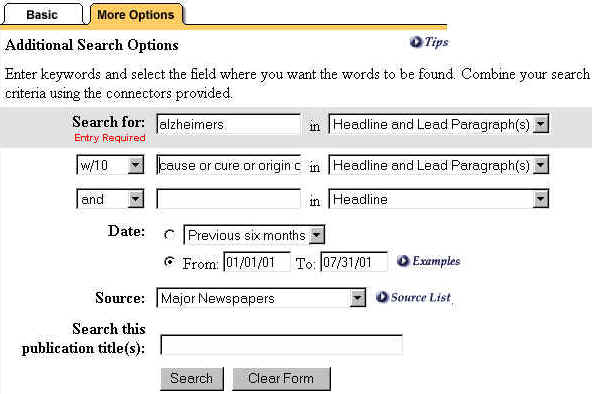
- Alter the search we did earlier by editing the second search area so that
it now reads "origin or cause or cure or treatment." Next,
delete Washington Post or New York Times from the Search This
Publication area. Keep the date 01/01/01 to 07/31/01. Your search
should appear as below.
- Click on "Search." You should get 180 or so articles. The
results should appear as below.
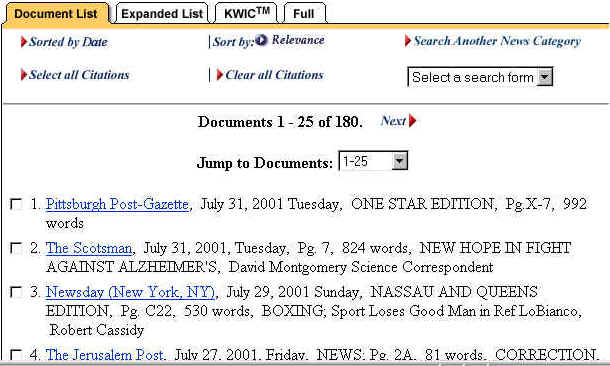
- You'll note that the articles are in reverse chronological order. It is
useful sometimes to have the most recent article come first, particularly so
if you are following a developing story. But, the most recent article may
not be the best article for your needs. That article might be 143 on the
list. You would likely never see it. Academic Universe's Relevance
function addresses this problem by reranking the articles not in a temporal
order, but in terms of how well the computer thinks an article agrees with
your request. It does this by using an algorithm that awards articles points
based on the number of times your search terms appear in the article and
where they appear. The closer your search terms are to the beginning or
"top" of an article, the more points it receives. That's because
words at the top of an article, generally speaking, are closely connected to
an article's subject because these words appear in the headline, the first
sentence, the first paragraph, etc., where a writer is declaring his
subject. It's nearly always a good idea to use the Relevance
function.
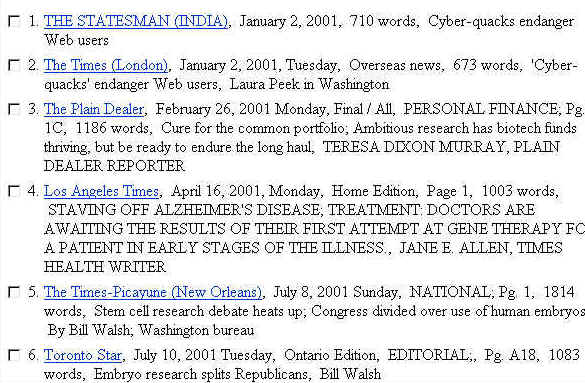
- Click on Relevance. You should see the articles below. Note that the first
three articles would have been among the last in list above, ranked by date.
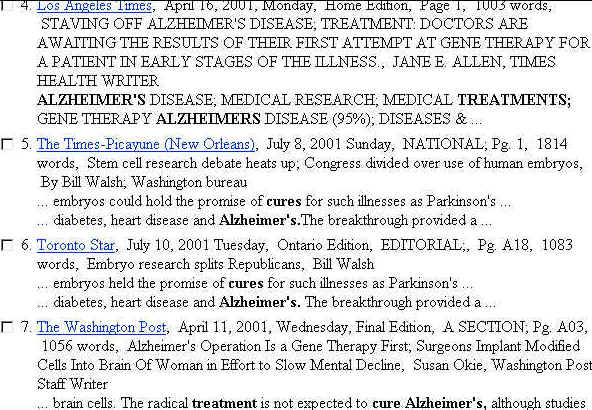
- The Expanded List function enables you to skim articles much faster than
you would normally. It does this by pulling the search terms out the
articles, providing a bit of context. You enable the function by clicking on
the Expanded List tab.

- Expanded List bold faces your search terms, allowing you to determine
whether or not you want to read an. See below.
Lagniappe
- "Lagniappe" is a Cajun word for a gift a merchant
might give a customer. If you bought a car, say, the merchant might thank
you for the business by throwing in a free tank of gas. That tank of gas
would be lagniappe. My lagniappe will consist of another search strategy,
one perhaps not obvious to most people, searching by article length.
Searching by Article Length
- Suppose you are doing a paper on, say, hip hop. You want an in depth
discussion of the topic. One way to narrow your search for "depth"
of articles is to focus on the length of an article. The longer the article,
the greater the depth. That's not to say that terrible articles cannot be
long ones. They can (and often are)--but they will be terrible (or terrific)
at length.
- Getting Academic Universe to search by "length" of
article is easy.
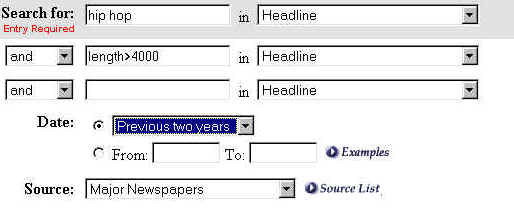
- Here's what the search looks like.
 l
l
Hip hop, the primary search term, went in the Search for: box,
which is set to examine the Headline and Lead Paragraph(s). The next box
contains the length syntax which is length>4000. 4000 is the number of words,
or about sixteen double spaced pages at 250 words a page. 4000 words is
long for a newspaper story. That's why the date is set at Previous five years,
to "balance" the 4000 words limitation. Even so we only get two
articles, one of which is an in depth look at the culture of hip hop. Searching
by length is a good way to narrow searches on very broad topics, like AIDS,
abortion, crime, etc. You'll tend to get "overview" or "the state
of _____" stories.
THE END
Send questions and comments to Coordinator
of User Instruction
WIU Libraries
| Western Illinois University | 1 University
Circle, Macomb, Illinois, 61455
Tel (309) 298-2159
Created on ... July 30, 2001