1 can be computed by the continued fraction:
Assignment Set Four
The contract grading system requirements for this assignment set are:
C REQUIREMENTS --On Time
Complete any program from Items 0 through 0. You must complete a total of ten items
B REQUIREMENTS --On Time
Complete three B level activities (Items L through O), out of which one of them should be on the computer and any other ten activities.
A REQUIREMENTS --On Time
Complete four B level activities (Items L through O) and any one A level activity (Items P through R). An extra A level activity can be used or counted as an A level on other programs. Total ten activities should be completed.
Bonus:
If you hand this assignment in ON TIME, you get one letter grade higher than indicated above. You can get an A+ by meeting the A requirements, which is averaged one letter grade higher than an A.
You also get four activities.
If you hand this assignment in SLIGHTLY LATE, you get four activity bonus. However, you don't get the one letter-grade bonus.
The dates for ON TIME and SLIGHTLY LATE will be announced in class when we discuss a few problems.
In this assignment set, the conventional grading system requires that you do Item I on the computer.
Note: For problems 0 to 0, a quart function of a number X is defined as:
20 +
B * X - A * X * X;Read in A and B from the keyboard (to be used in the quart function).
Check the quart function of all the numbers between 0 and 10 by 0.05 for the first number whose quart function is positive. Print that out on the screen.
ITEM B.
Read in A and B from the keyboard (to be used in the quart).
Check the quart function of all the numbers between 0 and 10 by 0.05 for the last number whose quart function is positive. Print it out.
Read in A and B from the keyboard (to be used in the quart).
Check the quart function all the numbers between 10 and 40 by 0.5. Include in the file quart.out all the numbers whose quart number is between 10 and 20.
Please put a newline between each number in the file.
Read in numbers from ASS40.IN, a file on disk. The last number in that file should be -10.
Put each negative number times two into ASS40.OUT, the output file. Ignore the -10 to end the list.
Thus, if the input in ASS40.IN is '52 82 32 -15 -5 -2 12 -10', the output in ass40.out would be '-30 -10 -4'
Read in two numbers from the keyboard. Call them
A and B.Read in some numbers from the file ASS40.IN. The last number will be indicated by zero.
Put in the output file, ASS40.OUT, any number, times three, that is between A and B. Be sure not to include the zero to end the data.
For example, if ASS40.IN contained '2 5 -7 -15 20 -11 30 2 0' and you read in '-10 10', then your output in ASS40.OUT would be '6 15 -21 6'.
ITEM F.
Read in two numbers from the keyboard. Call them A and B.
Read in some numbers from the file ASS40.IN. The last number will be indicated by a 6.
Put on the output screen, the last number that is not between A and B. Do not count the six used to indicate the end of ASS40.IN.
If the input file, ASS40.IN, contained '10 11 -12 4 -13 2 6', A was -10 and B was 8, then the output would be '-13'. (The 6 doesn't count as it's just a sentinel; and 2 is between -10 and 8.
Read in two numbers from the keyboard. Call them A and B.
Read in numbers from the ASS40.IN, the input file. The last number is indicated by a 6.
Put on the output screen, the first number that is not between A and B. Do not count the six to indicate the end of the file.
If the input file, ASS40.IN contained '10 11 -12 4 -13 2 6', A was -15, and B was 5, then
The output would be '-12'. 10 is outside the range specified by the user, as is 11.
Note: For problems 0 to 0, a quart function of a number X is defined as:
20 + B * X - A * X * X;
Read in the numbers A and B from the keyboard--these will be used in the quart function.
Read in the file ASS50.IN The last number will be indicated by a -1, which shouldn't be used.
Find the number whose quart function is the maximum. Print out that number as well as the result.
Read in the numbers A and B from the keyboard--these will be used in the quart function.
Read in some numbers from ASS50.IN, the input file. The last number will be indicated by a -1, which shouldn't be used.
Find all numbers whose quart function is positive. Compute the sum of those numbers.
Print that result on the screen.
ITEM J.
Read in the numbers A and B from the keyboard--these will be used in the quart function.
Read in some numbers from ASS50.IN, the input file. The last number will be indicated by a -1, which you should ignore.
Find all the numbers whose quart function is positive. Compute the sum those numbers.
Print that result on the screen.
Read in the numbers A and B from the keyboard--these will be used in the quart function.
Read in some numbers from ASS50.IN, the input file The last number will be indicated by a -1, which should get ignored.
Find all of the numbers whose quart function is negative. Compute the sum of the results from the quart function.
Print the sum on the screen.
Read in a series of numbers from ASS40.DAT, the input file. The last number will be indicated by -1.
Count how many numbers are less than the ordinal position within the file. For those who don't know what "ordinal position" means-- for first number, ordinal position would be one, for second number, it would be 2, for third, it would be 3, etc.
If ASS40.DAT contained '5 8 2 3 1 10 -1', then the output would be '3' as 2 is less than its ordinal position (3), 3 is less than its ordinal position (4), and 1 is less than its ordinal position (5).
Read in a series of numbers from ASS40.DAT, the input file. The last number is indicated by -1.
Determine which number is closest to its ordinal position. If two numbers are equally close to their ordinal positions, choose the number that is smallest. Print it out with its ordinal position. For those who don't know what "ordinal position" means-- For first number, ordinal position would be one, for second number, it would be 2, for third, it would be 3, etc.
If ASS40.DAT contained '10 9 5 2 99 -1', then the answer would be '4 2'. 5 is 2 units from its ordinal position of 3. 2 is also 2 units from its ordinal position of 4. However, 2 is the smaller than 5.
This program will read integers from a file THOSENUM.IN and perform calculations on them in the following order:
You will read in two integers and write their sum to an output file THOSENUM.OUT
Now you must use the number most recently read (I call it C) in the next calculation. Read in a new number from THOSENUM.IN and add it to the C. Write that sum to the output file, then continue as such until end of the input file.
So, if THOSENUM.IN contains '1 2 1 4 5', then your output file, THOSENUM.OUT, should contain '3 3 7 9'.
Hint: your output file should contain one less integer than the number of integers in your input file.
Hint see Unit 4.9 on Fibonnacci numbers which we may or may not cover in class.
The function 1 can be computed by the continued fraction:
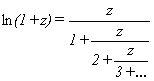
Read in the number Z and a number N. Compute for the given Z, the correct answer using the logarithm function provided by Turbo Pascal and the answer gotten by the above approximation. Use N to indicate how many divisions to perform.
Save your work from this assignment as there will be a similar problem in Assignment Set Five.
ITEM P. Level A homework assignment
This problem is worth three Level A activities.
The merge problem from hell!
You are assigned the task of computing the colors generated by stained glass arranged along a line. There are two files, MERGE.1 and MERGE.2 Each contains information that there is stained glass along a given line from a start position to an ending position. The information will be arranged in ascending order of length. Within either MERGE.1 and MERGE.2, there will not be any overlapping.
Also, for each piece of stained glass, there will be a 0 if the stained glass is red, a 1 if it is blue, and a 2 if it is purple.
You are to produce a file called MERGE.OUT which will contain the result after line is shown through the stained glass in either glass.
Thus the rules of combination are:
red (0) and red (0) -> red (0)
red (0) and blue (1) -> purple (2)
red (0) and purple (2) -> purple (2)
blue (1) and red (0) -> purple (2)
blue (1) and blue (1) -> blue (1)
blue (1) and purple (2) -> purple (2)
purple (2) and anything else gives purple
There may not be stained glass indicated at all points along the line for one or both input files. Any color in one file combined with no corresponding file means that the MERGE.3 file will contain 0 for that position.
The last data in MERGE.1 and MERGE.2 would be indicated by three zero's.
You should ensure that MERGE.OUT contains no consecutive intervals with the same color. (They should be combined into one interval.) However, MERGE.1 and MERGE.2 may contain such consecutive intervals. Also put three zeros at the end of MERGE.OUT
You should ensure your solution runs in linear time in the input lengths -- you don't go back over the intervals. More formally, this means that if your program takes n seconds to process x numbers, it will take 2 * n seconds to process 2 * x numbers. It should only read each number in each file once.
Also your program takes constant storage. That means no arrays--which we haven't learned by that unit. You must do everything with the input variables and some small number of temporary numbers.
Note that MERGE.OUT is in the format acceptable as input to your program. Thus you could issue a DOS copy command to copy them.
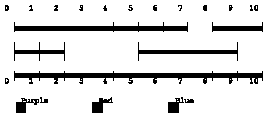
Example, if MERGE.1 contained
0 4 0
4 5 1
5 6 1
6 7 1
8 10 0
0 0 0
and merge.2 contained
0 1 0
1 2 1
5 9 1
0 0 0
then MERGE.OUT should contain
0 1 0
1 2 2
2 4 0
4 8 1
8 9 2
9 10 0
0 0 0
ITEM Q. Level A homework assignment
This problem is worth two A activities.
Your assignment is to draw on the screen, a triangle striped with alternate red and yellow horizontal lines.
Read in the coordinates of three points from TRIANG.IN, the input file.
That is you will read in three pairs of numbers, each pair consisting of an x-value and a y-value They will represent the three vertices of your triangle Then read in from the file TRIANG.IN an integerM.
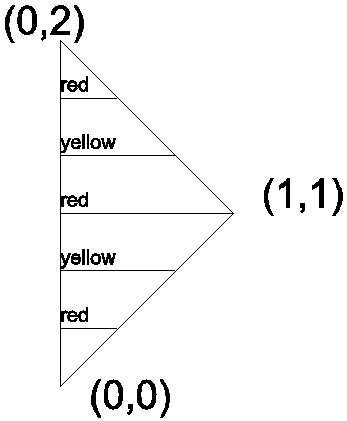
You are to draw M horizontal lines, that divide the triangle into equal spaces. The first line from the top should be in red, the next one should be in yellow, the next one should be red, etc. See the figure to the right of this text. (The numbers and lettering in the figure are NOT to appear in your graphics display--they are just there for your reference.) There is no guarantee as to what order the points may be in the file nor is there a guarantee that the number of stripes will be odd or even.
ITEM R. Level A homework assignment
We will use this code in the next assignment set for the A graphics-like problem.
Read in M and N from the keyboard or a data file. (I don't care which.)
Draw a collection of M rows of N square boxes, each juxtaposed in such a manner that the M rows fill the entire top to bottom of the screen. If the boxes won't fit from left to right on the screen simply print an error message and stop.
You will have to determine the height and width in pixels of the screen. This varies from screento screen as most of you have noticed. GetMaxX and GetMaxY can be used to tell you how big the screen you are on really is. Your program should work on any screen of any computer.
Please draw all the lines in white.
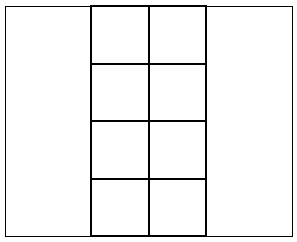
For example if M were 4 and N were two, your screen should like this.
(Note that the darker lines represent the liens you draw and the lighter lines represent the boundaries of the screen.)